Fire Solutions · Cloud Monitoring
Remote fire alarm panel monitoring across your entire property portfolio
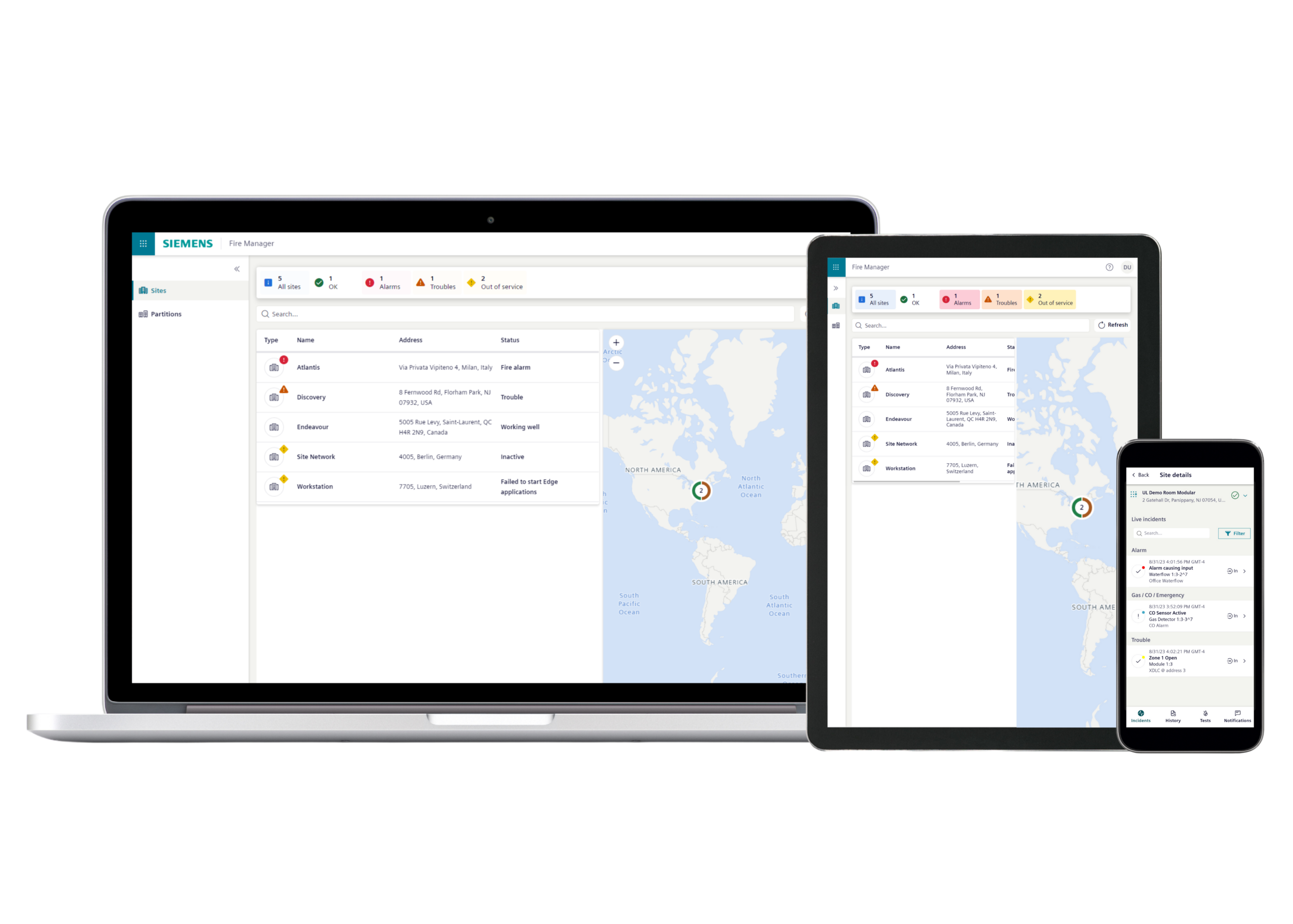
Siemens Building X Fire Apps is the cloud-based monitoring platform for Cerberus PRO fire alarm panels. Real-time alarms, troubles, and supervisory events on a single dashboard, accessible from web or mobile. Faster response, no on-site visit just to investigate.
Works across the Cerberus PRO family. Building X connects to Cerberus PRO Modular and Compact panels uniformly — same dashboard, same mobile app, regardless of which panel tier your buildings run.
Building X Fire Apps is the Siemens cloud service that connects Cerberus PRO Compact and Modular fire alarm panels to a web and mobile dashboard. Every panel under your portfolio appears in one view — current status, real-time alarms, supervisory events, history. CAINtech installs the Connect X300 gateway, onboards your team, and manages the ongoing service tier as part of your inspection contract.
24/7
Remote panel access
Multi-site
Portfolio dashboard
Mobile
Web + iOS + Android
What Building X Fire Apps does
Three core capabilities, all delivered through one cloud platform connected to your Cerberus PRO panels:
Real-time panel monitoring
Alarms, troubles, and supervisory events appear on the dashboard the moment they occur on the panel. Event detail includes timestamp, zone, device address, and severity classification.
Multi-site portfolio view
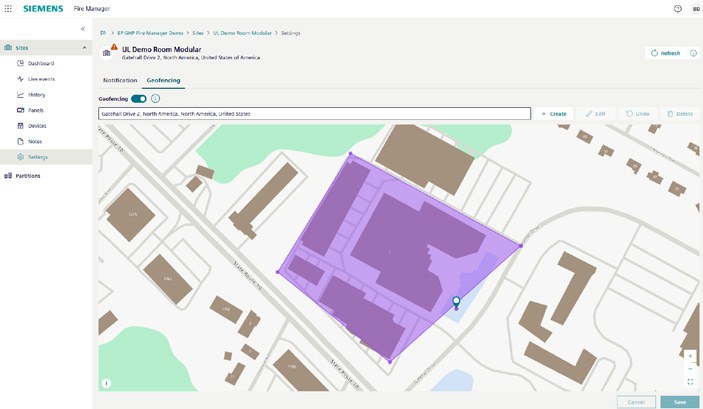
Every Cerberus PRO panel under your management appears on one dashboard, with geofenced site locations. Status visible at a glance across the portfolio.
Mobile + web access
Same data on iOS, Android, and any web browser. Self-test triggers, event acknowledgement, and history review work the same on phone or laptop.
How it works
Connecting a Cerberus PRO panel to Building X involves one piece of hardware (the Connect X300 external gateway), commissioning the panel-to-cloud link, and onboarding your team to the dashboard.
- Connect X300 gateway installs on each Cerberus PRO panel. CAINtech handles the commissioning under our Solution Partner authorization.
- The gateway sends fire-event data to the Siemens Building X cloud over the building’s internet connection (TLS encrypted).
- Your team and CAINtech access the dashboard from web browser, iOS, or Android. Multi-user access; role-based permissions.
- CAINtech responds to events faster — no on-site visit required just to investigate. Trouble signals can often be diagnosed remotely; only physical service requires a truck roll.
Cloud connectivity reduces business disruption and wasted travel time to investigate issues, while also increasing response time to quickly address them.
Siemens UL Fire Portfolio (March 2025)
Compatible Cerberus PRO panels
Building X Fire Apps works with the Cerberus PRO Compact and Modular panel tiers. The Connect X300 external gateway is the required interface between the panel and the cloud:
- Cerberus PRO Compact FC922 (252-point panels)
- Cerberus PRO Compact FC924 (504-point panels)
- Cerberus PRO Modular (up to 2,500 addressable devices)
Not yet on Cerberus PRO? CAINtech designs new installations and migrations from end-of-life Siemens MXL and other platforms. See Fire Alarm Systems.
Who benefits from Building X cloud monitoring
Condo boards
High-rise condo corporations managing one or more buildings. Board members get fire-system visibility without staffing a 24/7 monitoring desk.
Commercial REIT / portfolio managers
Multi-building commercial portfolios with central facilities management. Single dashboard across the portfolio.
Property management firms
Firms managing diverse property mixes — commercial, residential, mixed-use — for multiple owners. Per-property partitioning of dashboard access.
Single-building owners
Building owners who want 24/7 fire-system visibility on their phone without staffing a dedicated monitoring desk.
Why CAINtech
Solution Partner + service team. One contract.
Frequently asked questions
What does Building X Fire Apps actually do?+
Is my existing Cerberus PRO panel compatible?+
Does Building X replace my ULC-listed central monitoring station?+
What does the subscription cost?+
How fast is event notification?+
Can I share dashboard access with my facility team?+

Add cloud monitoring to your Cerberus PRO panels
Send us your portfolio scope — how many panels, where, and on which Cerberus PRO tier. We come back with a Connect X300 + subscription quote inside the next business day.